

Our Top Picks


The best aquarium light timer is a reliable digital or smart plug timer rated for your fixture’s load, with a battery or app backup so a power blip does not reset your schedule. A consistent photoperiod is one of the cheapest, most effective ways to control algae, and a timer takes forgetfulness out of the equation. These are the types and models worth comparing, drawn from specifications and reviewer feedback.
Comparison Table
| Pick | Best for | Key feature |
|---|---|---|
| Intermatic Heavy-Duty Mechanical Timer | Set-and-forget simplicity | Mechanical dial, no electronics to reset |
| BN-LINK 7 Day Digital Timer | Different schedules by day | Programmable digital controls |
| Kasa Smart Wi-Fi Plug | Remote control and schedules | App scheduling and away mode |
| TP-Link Tapo Smart Plug Mini | Compact outlet coverage | Small footprint, app control |
| Century Digital Outlet Timer | Basic digital use | Straightforward programming |
| GE Mechanical Indoor Timer | Inexpensive backup timer | Simple 24 hour dial |
Why a Timer Matters
Fish and plants respond to routine. A light that comes on and off at different times each day confuses fish and invites algae. A timer provides a steady photoperiod, which is typically between six and eight hours for most tanks. It also helps avoid the classic mistake of leaving the light on all night after a late evening. Because timers sit between the wall and your equipment, they must be rated for the load, and if the fixture has electronics, a clean power supply matters as well.
1. Intermatic Heavy-Duty Mechanical Timer
Mechanical timers have a dial with tabs you set by hand. They have no screens or batteries to fail, and they survive power outages by simply continuing once power returns, though the time may drift. Intermatic’s heavy-duty models are favored by aquarists for their durability. They are not as flexible as digital timers, they can click audibly, and the interval resolution is coarse. A dependable choice for a simple lighting schedule.
Intermatic heavy-duty mechanical timer
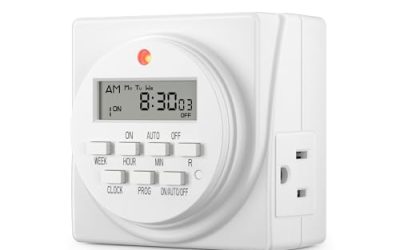
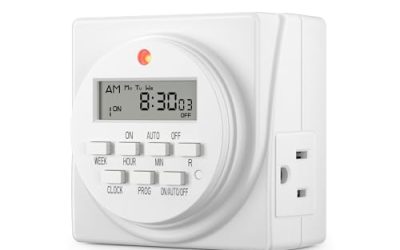
2. BN-LINK 7 Day Digital Timer
Digital timers allow multiple on and off periods and different programs by day. That helps if you want a midday break to discourage algae or a different weekend schedule. BN-LINK models are widely sold and generally simple to program once you read the instructions. Weaknesses include basic plastic and sometimes a dim display, and cheap internal batteries can fail, so check whether the settings are retained after an outage.
3. Kasa Smart Wi-Fi Plug
A smart plug lets you schedule lights from your phone and check status remotely. That is handy when traveling. Kasa plugs are common and generally easy to set up, and some versions support schedules that continue even if Wi-Fi drops. Remember that smart plugs rely on your network and app ecosystem, so do not use them for critical life support like heaters unless you accept that risk. For lights, they are a convenient upgrade.
4. TP-Link Tapo Smart Plug Mini
The Tapo Mini is a compact smart plug that fits on crowded power strips. Its scheduling features cover sunrise and sunset options, and the app is straightforward. Make sure the load rating suits your fixture, and consider the physical size if you are plugging into a tight cabinet. It is a good choice if you already use the Tapo ecosystem.
5. Century Digital Outlet Timer
This is a basic digital timer with simple programming and a plain interface. It suits aquarists who do not want a phone app but want more accuracy than a mechanical dial. Programming can feel old-fashioned, and features are limited, but that simplicity is a strength for a single tank light. Check the maximum load and use it only with lighting.
6. GE Mechanical Indoor Timer
A cheap mechanical timer such as the GE model is a decent backup to keep in a drawer. It handles basic lights, and replacing it costs little. It is loud, not precise, and not intended for demanding setups. Use it as a spare, not as the centerpiece of a high-end tank.
How to Choose
- Load rating: confirm the timer can handle the fixture’s wattage and type of load.
- Outage behavior: prefer a battery backup or a design that keeps time after power loss.
- Flexibility: digital models allow midday breaks and weekend schedules.
- Convenience: smart plugs add remote control but depend on Wi-Fi.
- Safety: use a drip loop on cords and keep plugs above the water line.
Setting the Right Schedule
For most tanks, start with six hours and increase gradually if plants demand more. Some hobbyists use a siesta, with a few hours on, a few hours off, then on again, which can reduce algae in some setups. If you have both a main light and a moonlight, put them on separate channels so they do not overlap. Review the schedule every few weeks, since seasonal ambient light and plant growth change.
Common Mistakes
People often exceed the timer’s rated load, which leads to heat and early failure. They also forget daylight saving time shifts on simple digital timers, leading to a drifting schedule. Plugging a heater into a cheap timer is dangerous, because heaters are heavy loads and a failure could lead to cold or hot water. And many forget to test the timer after a power outage, assuming everything is fine.
Mechanical, Digital or Smart: A Practical Take
Mechanical timers are the most forgiving. There is no menu to navigate, no screen, and no battery. If you only need one on and one off time per day, they are hard to fault, though the click and slight drift annoy some people. Digital timers are the middle ground: precise to the minute, programmable for a midday break, and still independent of Wi-Fi. They do need a working backup battery to remember settings, so check reviews on that point before choosing one.
Smart plugs add the ability to schedule from a phone, receive notifications and switch lights on during a feeding or photo session without walking over. The downside is dependence on a router and an app account. If the network is flaky, lights may not follow schedule until it recovers, which is why many smart plugs store schedules locally. Whichever you choose, label the plug at the wall so nobody unplugs the wrong one while cleaning.
Finally, think about how many things you want to control. A power strip with a built-in timer can cover a light and a moonlight, but it should never be shared with a heater or a filter. Keep life support on its own always-on circuit.
Frequently Asked Questions
Can I put an aquarium heater on a timer?
It is not recommended. Heaters draw heavy current and should run continuously under their own thermostat.
Are smart plugs reliable for aquariums?
For lights, yes in most cases. They depend on your network, so keep a manual fallback.
What happens after a power outage?
Mechanical timers continue but may drift. Digital timers may reset unless they have a battery backup.
How many hours of light is right?
Six to eight hours suits many tanks. Adjust based on algae and plant response.
Conclusion
A timer is cheap insurance against algae and an erratic routine. Choose a unit rated for your load, with outage protection, and match its flexibility to your needs. For most hobbyists, either a reliable digital timer or a smart plug is a good fit.
As an Amazon Associate we earn from qualifying purchases.
More from Amazon
Programs that pair well with the guide above. Offers and eligibility are set by Amazon and may change.
Set up recurring deliveries of everyday items on eligible products. Terms and savings are set by Amazon.
Explore Subscribe & SaveFree shipping on eligible items, Prime Video and more. Eligible new members can start with a free trial.
Start a Prime free trialAudiobooks and podcasts to listen to on the go. Eligible new members can start with a free trial.
Try Audible freeRead from a large library of eBooks and audiobooks on any device. Check Amazon for current plans.
Explore Kindle UnlimitedAs an Amazon Associate we earn from qualifying purchases.
Write Your Review
No reviews yet. Be the first to share your experience!